STEP 2 OF 3

Wi-Fi Pairing, Cloud Servers & Security

Connect to a 2.4 GHz wireless network, select your cloud server region, and configure stream encryption.

ADVERTISEMENT

๐Ÿ“ถ Part 1: Wi-Fi 2.4 GHz Network Configuration

Smart cameras use 2.4 GHz wireless signals for superior penetration through walls and longer transmission range. Dual-band 5.0 GHz is not supported.
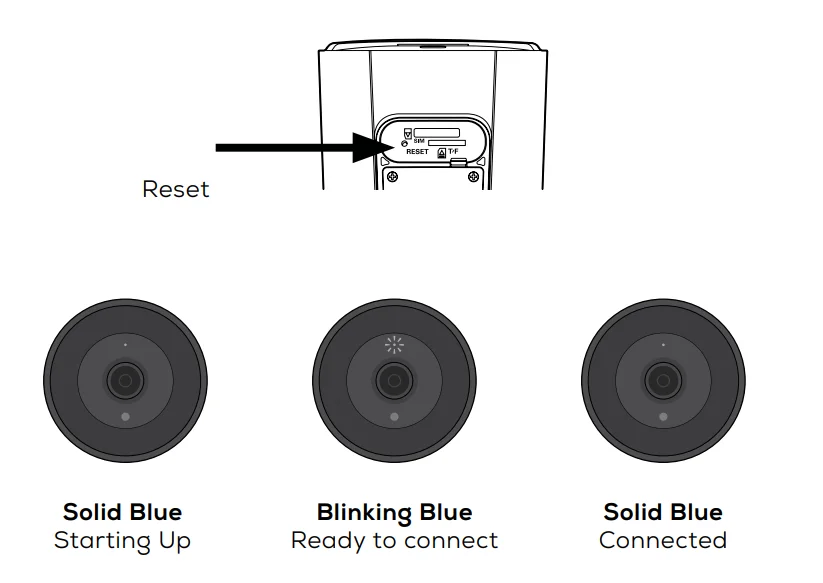
Merkury Network Image WiFi Manager
Router Pairing Checklist:
ADVERTISEMENT

๐ŸŒ Part 2: Cloud Relay & Server Routing Nodes

Select your nearest regional cloud server node for minimum P2P streaming latency:

๐Ÿ“ Active Node: Server 1 (US East) โ€” Estimated P2P Latency: 18ms. Optimal for live 1080p stream transmission.

๐Ÿ›ก๏ธ Part 3: Camera Password Security Validator

Set a dedicated device password to encrypt local RTSP stream tunnels against unauthorized interception.

Password Security
Live Password Security Meter:
Enter 8+ characters with uppercase, numbers, and symbols.

๐Ÿ”’ Wi-Fi & Device Security Guidelines

Smart Wi-Fi security cameras operate exclusively on the 2.4 GHz frequency band for maximum wall penetration.